Engineering
A better browser agent, without a new browser
How we built Zalos’s harness and reached 94/100 on BU-Bench-V1 using GPT-5.5 with Chrome.
By Hung Hoang
We built Zalos for finance and operations teams whose work spans accounting systems, spreadsheets, email, and web applications. Their browser already holds the accounts, extensions, and sessions they depend on. We want to automate that work without asking them to move it into a new browser.
In our first browser benchmark, Zalos completed 94 out of 100 tasks on BU-Bench-V1 using GPT-5.5 with Chrome. We tested through our Zalos desktop app and Chrome extension, connected to an everyday browser session.
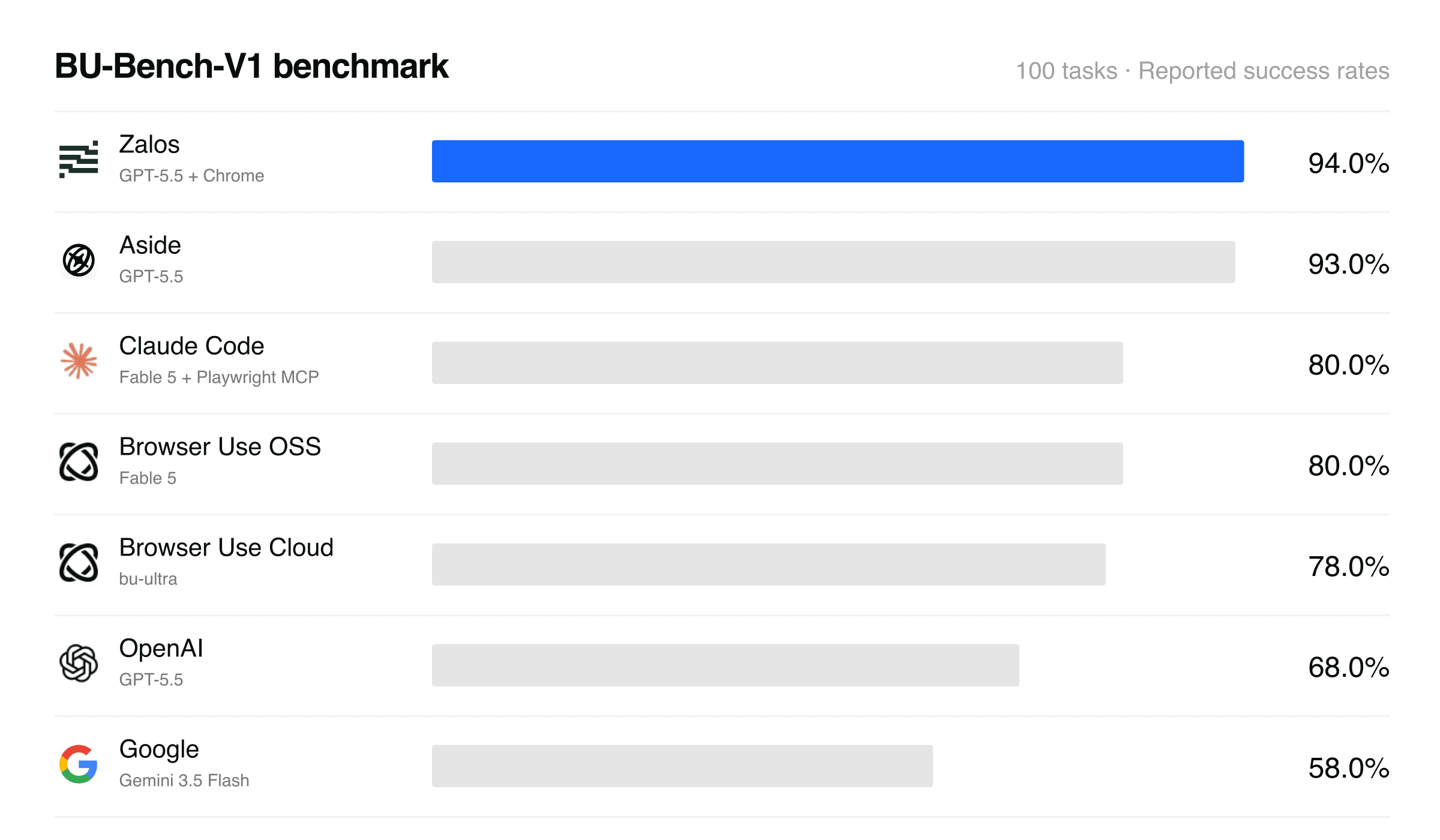
Our 94% score is above the published results shown here for Aside and the Fable 5–powered agents running through Claude Code and Browser Use.
Scores come from separate evaluations with different models and browser conditions. Aside, Claude Code, OpenAI, and Google figures come from Aside’s engineering post; Browser Use figures come from its BU-Bench-V1 results. These results compare complete systems and do not isolate the effect of the model or harness.
The engineering question behind this work is how to turn a model’s decisions into reliable actions inside a browser that a person is also using. We focused on the harness: the software that gives the model observations, executes its actions, and reports what happened.
Design for the browser people already use
AI-native browsers such as Aside and OpenAI’s Atlas have explored building browsing around an agent. Zalos connects to the user’s existing browser. Our goal is to compete with and ultimately outperform those agents while letting users keep their daily tools.
That choice introduces constraints. Other extensions can react to the same input fields. Navigation can replace the page while an action is running. A dialog can block a browser command even after the agent has clicked the correct button.
The model needs to know whether an action completed, encountered a recoverable interruption, or requires the user. When the harness collapses those outcomes into a generic timeout, the model has less information for its next decision.
A coding agent connected to your browser
Zalos combines browser controls with a coding environment. The agent can inspect pages, navigate websites, write code to process information, and use research tools. The browser is one of the environments it can work in.
We learn from open-source agent projects in how we approach tool execution, skills, context management, and recovery. Our work here focuses on how those capabilities behave in a live browser session.
The following examples show the problems we encountered and the constraints we put on each fix: keep input directed at the intended field, distinguish interruptions from failures, and recover without changing the requested action.
1. Treat focus as part of the typing operation
The agent selected the correct field, but focusing it could open 1Password’s interface inside another extension’s protected iframe. Chrome then detached the debugger session before text insertion completed. Repeating the same typing command could trigger the same failure.
We prepare the target input before focusing it, using 1Password’s documented field hint. We preserve hints supplied by the website and remove the hint we added after the field loses focus. We also check focus around selection and insertion.
The change applies only to the field the agent is writing into. We reproduced the conflict with a second extension and tested typing and filling through Chrome’s actual debugger adapter. The test covered the interaction between extensions, where the failure occurred.
2. Make interruptions explicit
A form submission appeared to time out because the page opened a JavaScript alert. Chrome was waiting for the mouse-release acknowledgment, leaving our command blocked.
We now observe dialogs before focus and input begin. Informational alerts are dismissed, and a limited amount of their text is returned as evidence. Confirmation, prompt, and before-unload dialogs remain for the user to answer in Chrome. The agent receives a distinct dialog-open result.
Stop and command deadlines also release pending protocol calls, with a time limit on debugger cleanup. A cancelled operation should return control even when the page stops responding.
These outcomes give the agent a basis for deciding whether to continue, inspect the page, or wait for the user.
3. Bound recovery and preserve the target
A screenshot failed when navigation replaced the page’s execution context while we were waiting for images to settle. The tab still existed, but the context used by the pending operation no longer did.
For that specific failure, we refresh the main-frame context once and retain the original deadline. Repeated context loss, unrelated errors, and cancellation still return errors. Recovery cannot extend the wait indefinitely.
An element screenshot also keeps its original target. If that target is no longer available, the tool cannot silently return an image of the whole viewport and call the operation successful. The result must still mean what the agent requested.
4. Preserve evidence the model needs
A model can only reason over the information its tools return. We fixed table extraction inside shadow DOM and retrieval of historical console logs so observations could include data and events that earlier reads missed.
Research tools need similar care. We bundled an existing research skill so new app profiles could load it. Its helpers preserve empty table cells and parse subtitle timing lines. Dropping an empty cell can change how a row is interpreted; confusing a subtitle with a timestamp can lose source text.
These changes make the returned evidence more faithful to the source.
Beyond the browser
Finance and operations teams also use traditional desktop applications. Zalos’s computer-use capabilities let it interact with their visible interfaces when work moves outside the browser.
In this clip, Zalos controls GnuCash on a remote Windows desktop. It enters a $425 expense split across office supplies and software subscriptions using synthetic demo data.
This desktop demo is separate from the BU-Bench-V1 browser evaluation.
We’ll cover computer use in a follow-up post, including how it helps teams work with older software that has no modern API or browser interface.
Next evaluations
BU-Bench-V1 is our first benchmark. We plan to share further evaluations, including Odyssey, to test Zalos on different tasks and longer workflows.